
 Jeff Robbins of Lullabot brings to us a rather nifty jQuery plugin in the form of BeautyTips, a tooltips plugin which uses the canvas drawing element from the HTML 5 spec to draw tooltips/talk bubbles/help balloons that can be associated with any specific HTML element on a web page. These tooltips are highly configurable in terms of look and feel, and can be fired based on a number of different events, including your standard mouseover right the way through to on focus and key up for textboxes!
It works natively with modern versions of FireFox, Safari and Opera, and with a small inclusion of the Explorer Canvas extension created by Google, it even comes to life in Internet Explorer.
Each tooltip that gets drawn is positioned on the side of the target element which has the most free space, meaning that the tooltip responds to window sizing and scroll position, making it quite robust in terms of not getting hidden by smaller windows’ border positioning.
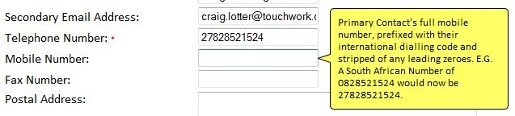
BeautyTip in action: this time fired by clicking on an input text box.
Attaching and using BeautyTip in your site is ridiculously easy.
Simply download and reference the plugin script in the head of your page, and then use a bit of jQuery magic to attach the BeautyTip function to a specific element like so:
hover
$('#example1').bt();
And that’s it. Couldn’t be any easier to get a great looking result that is sure to clean up your interface in terms of hiding all those tidbits of help that you keep tossing about the place so! :P
Related Link: http://plugins.jquery.com/project/bt
You might also enjoy:
-
 Flot is a fantastic jQuery-driven graphing engine that is extremely flexible and capable of producing some wonderfully looking and interactive graphs. To ...
 -
 Now while there are quite a number of excellent flash-based graphing libraries out there in the wild, it turns out that there aren't actually all that many ...
 -
 Before jQuery's native live() and delegate() functions came into being, the default for handling binding on late generated DOM elements was to make use of t ...
 -
To toggle an element in terms of visibility, like a DIV for example, is pretty easy with jQuery and its ultra nifty toggle() function. First, simply decl ...
-
If you ever make use of the document.body.clientHeight attribute in either your vanilla Javascript or jQuery code, you would have noticed by now that someti ...


