
Probably not an Earth-shattering Ubuntu keyboard/mouse combo shortcut for today’s CodeUnit post, but it is quite a useful one to know and it is pretty widely adopted as a kind of a standard, particularly seeing as Windows also allows for the same kind of zooming using the same keyboard/mouse combo sequence.
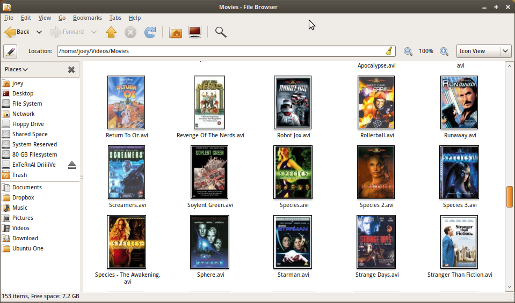
Anyway, what I’m talking about revolves around Ubuntu’s folder listings and more importantly the files kept inside of any particular folder. Now when bringing up a folder view you’ll notice the drop-down list on the right of the toolbar that holds the various view items which can be applied to the current folder view. To the left of that is a magnifying glass and the currently applied level of ‘zoom’ which affects how enlarged the icons below actually appear.
Now obviously you can control the zoom level by moving the mouse and clicking on the magnifying glass but there is in fact a faster way of achieving this and that is through the use of today’s keyboard/mouse combo shortcut.
Hold down the Ctrl button on your keyboard and use the mouse wheel to scroll either up or down. You’ll notice that by scrolling up you are in fact enlarging the icon view while scrolling down is actually reducing the zoom level.
So like I said, silly, but not entirely useless to know. :P
You might also enjoy:
-
 A nice little trick that Vista allows for is the simple zooming in and out of the various explorer folder views by simply holding down Ctrl and using the mo ...
 -
 After updating a couple of packages on my Jaunty Jackalope Ubuntu installation the other day, I was quite annoyed to find that all of a sudden my numeric ke ...
 -
 Preview MP3 Music Files in UbuntuUbuntu has for a while now (and this is still to be found in the latest Karmic Koala release) included an extremely nifty and helpful little built in previe ...
 -
 I make heavy use of WinSCP to transfer project files across to our production servers from my Windows development machine. Recently though, I needed to swit ...
 -
 If you want an even quicker way of launching a terminal command line window outside of navigating to the Applications menu, selecting Accessories and then c ...


